Group Summary Totals - 2nd Try
Posted: Mon Dec 29, 2025 7:55 pm
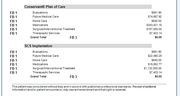
I'm unable to get the summary total that I want. The image below shows the relevant portion of the report. The category totals (FB 1 for FooterBand1) total the hidden band for Items correctly. Good. But I can't seem to get the correct Grand Total (FB 3 for FooterBand3) of all the categories for each of the two Options (shaded gray).
This is the report:
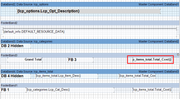
Note: The two hidden bands have "Calc Invisible" set to True.
I have tried various combinations of {Sum(DataBand3,lcp_items_total.Total_Cost)} or {Sum(lcp_items_total.Total_Cost)}, etc etc. Nothing seems to work. I know there is nothing fundamentally wrong. It's either incorrect use of parameters in the Sum function or something about the bands. It can't be this hard! And, yes, I have persused the Help documentatiion extensively.
Please advise.
Thanks
This is the report:
Note: The two hidden bands have "Calc Invisible" set to True.
I have tried various combinations of {Sum(DataBand3,lcp_items_total.Total_Cost)} or {Sum(lcp_items_total.Total_Cost)}, etc etc. Nothing seems to work. I know there is nothing fundamentally wrong. It's either incorrect use of parameters in the Sum function or something about the bands. It can't be this hard! And, yes, I have persused the Help documentatiion extensively.
Please advise.
Thanks