How to integrate Group Summary Totals?

Stimulsoft Reports.PHP discussion
Post Reply
PeterG
Posts: 18
Joined: Sun May 25, 2025 8:22 pm

How to integrate Group Summary Totals?

Post by PeterG »

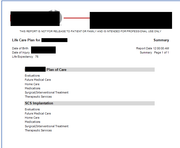
I have a report with 3 linked data bands. So far so good. But I'm unable to get the summary totals to work. In simple terms the three linked tables are Plans (one record) - Options - Categories. This works. See below.

Image

I've created a hard-coded report that shows the summary vales. that works, but it's a hard-coded example. See below.
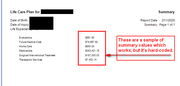
Image

This is the hard-coded query:

Code: Select all

SELECT
	lcp_categories.Lcp_Cat_Desc,
	lcp_categories.LCP_Cat_Id,
	lcp_categories.Lcp_Cat_Id_Original,
	lcp_categories.Lcp_Opt_Id_VarChar,
	lcp_categories.LCP_Opt_Id,
	lcp_categories.Created,
	lcp_categories.Udated,
	SUM(lcp_items.Total_Cost) AS Items_Total
	FROM 
	lcp_categories
	INNER JOIN 
	lcp_items ON lcp_items.LCP_Cat_Id = lcp_categories.LCP_Cat_Id
WHERE 
	lcp_categories.LCP_Opt_Id = 2491
GROUP BY
    lcp_categories.`Lcp_Cat_Desc`
ORDER BY
	Lcp_Cat_Desc
I need the summary values to show in the report based upon the link to the options DataBand.

Here is what the report looks like in the builder:
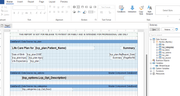
Image

So how do I put this together ?
Lech Kulikowski
Posts: 7568
Joined: Tue Mar 20, 2018 5:34 am

Re: How to integrate Group Summary Totals?

Post by Lech Kulikowski »

Hello,

Try to use the Sum function:
https://www.stimulsoft.com/en/documenta ... totals.htm

Thank you.
PeterG
Posts: 18
Joined: Sun May 25, 2025 8:22 pm

Re: How to integrate Group Summary Totals?

Post by PeterG »

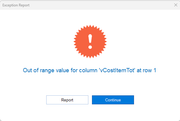
Thank you for the pointer. Unfortunately the Help documentation does not provide examples on how to implement this. I did try to do it but it didn't work and the report wouldn't render in the builder's viewer. So I deleted the expression from the report. However, that seemed to have created a "ghost" variable that I can't get rid of. Now when I try to preview the report it gives me an error message:

Image

Worse yet, when I switched to a backup report (where I never tried to do that summary calc), I now get the same error! IT seems as if the builder cross-contaminated the backup report some how!!! Ho do I get rid of that ghost variable?

Thanks
Lech Kulikowski
Posts: 7568
Joined: Tue Mar 20, 2018 5:34 am

Re: How to integrate Group Summary Totals?

Post by Lech Kulikowski »

Hello,

Please send us a sample report with test data that reproduces the issue for analysis.

Thank you.
PeterG
Posts: 18
Joined: Sun May 25, 2025 8:22 pm

Re: How to integrate Group Summary Totals?

Post by PeterG »

Sent to your attention last night (my time).
Thanks
Lech Kulikowski
Posts: 7568
Joined: Tue Mar 20, 2018 5:34 am

Re: How to integrate Group Summary Totals?

Post by Lech Kulikowski »

Hello,

Thank you. We will check it and let you know about the result.
Post Reply